 Higher level skills that support other skills ...
We all know that development and skill levels build upon themselves. Easier to more challenging. But sometimes, it is the smallest things that can trip a student up. Things that we are surprised they don't know or do. Here are a few things to take a look at. You may be surprised by what is missing...

Number Dots: Dots representing numbers are always depicted in the same pattern. Recognizing the pattern and knowing it's value instantly is a valuable skill, rather then needing to count the dots each time. The number 5 is always 4 dots in a square with an additional dot in the middle. Domino's, dice, playing cards all use the same patterns.
Number Race Activity: Shake a number of die in your cupped hands (sneak in palmar arch practice!) then spill out. As quickly as possible call out the numbers. These get recorded and the first number to appear 10 times wins.
Play domino's or yatzee! No dot counting allowed!
 
Groupings: Counting any quantity of objects is always easier if split into smaller groups first. If for example, you are counting a stack of papers. You may make bundles of 10, before adding them together. Groupings are especially useful when "counting in your head".
Visual Grouping Activity: Toss a small handful of small objects onto the playing surface. Discuss ways they can be grouped; closest to each other; by color; by shape, etc. Then practice physically making the groups then counting. Next time only physically group 1/2 the objects and try to just visually group the rest. After coming up with a number, check by grouping and counting.
Jig work: Introduction to grouping can begin very early in development. Draw 10 circles on a paper. Ask the client to place one of the given objects on a circle. When all 10 circles are full, transfer them all together into a bag or cup. This also is useful when there are many pieces of a game that must be cleaned up and the client feels overwhelmed and doesn't know where or how to begin.
Play Jacks: Remember this classic game. It forced you to look for groupings to make them easier to pick up. Use pegs and a tennis ball as a substitute for "real jacks".

Copying from the board or a book:
For many students this is one of the most challenging tasks in the day. Practice "remembering" the letters of whole words rather than a letter or 2 at a time. Also approximate where in the sentence you are up to in copying and what the last word copied was. Have eyes try to "jump" or quickly scan to that word instead of needing to start at the beginning each time.

#3 or 5 can go on the #4. An ace or 3 can go on 2.
Sequences and Rapid Fill-in the blank:
Given any number or letter, can they quickly state what comes next or do they need to start at the beginning each time. Being able to "jump in" is more efficient and requires higher level thinking.
Playing Cards: Games like "higher-lower war" are great for this. Each player gets 1/2 the deck. Player 1 turns over his 1st card and places it face up in front of them. Player 2 flips his top card over. If it is the next card higher or lower than player 1's card, it gets placed on that players stack. If it is not, then it goes face up in front of player 2. Continue taking turns until a player is out of cards. They are the winner.
On Special This Week:
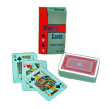
Mini Playing cards: 2" glossy finished playing cards. Great size for smaller hands or makes larger hands work harder. Unlimited uses for therapy and play. Small and convenient for travel and therapy bags.

Mini Dice Set: These tiny 1/4" little guys are real dice in mixed colors. So cute and appealing everyone will want to play. You get 24 in a package along with activity ideas. Great for number and color matching, picking up with hand tools or with fingers for in-hand manipulation work. Also develop the arches of the hand as you practice that perfect roll!

Copying From the Board: This activity workbook has a wide variety of graded activities to help children copy accurately and legibly from the board. 112 pages of exercises for improving eye hand coordination, visual & auditory memory, ocular motor skills, figure ground & near-point/far-point copying in both manuscript and cursive writing.This is a truly wonderful resource.
|
Tips for copying from board, counting, sequencing that can improve efficiency
<![endif]-->


The New TurnUnit 3D Balance Trainer (aka Dizzy Disc Senior!)

 New design with a 300lb weight limit easily accommodates teens, Tweens and adults ! You know this toy is a "must have" for sensory seekers and others that just gotta spin regardless of age. 16" non-skid platform adjusts angle to challenge balance and change sensory input. Sit, lay or stand (with caution!). Also great for rehab and sports training. Strengthens core too! Here's more info:
Quick Neuro review...


Improve hand skills with rubber bands!

Doriet Bialer, OTD, MA, OTR has developed a number of hand splint designs using only rubber bands and surgical tape. These splints are quick, temporary, inexpensive and easy to do "on the fly".
Her new manual, "Functional Hand Splints: An Easy DIY" demonstrates step-by-step how to 'twist and turn' a rubber band to improve various grasp patterns, even a dynamic tripod grasp for handwriting. Imagine, walking into a classroom, with just rubber bands and tape, and immediately being able to influence a students skills!
 Available as a set with manual and enough materials to get you started, manual only (you have to gather materials) or materials only (refills).
Visual Tracking Activities with Touchable Bubbles
 YES! A bubble that doesn't always break when you touch it or when it lands on a surface. Players can REALLY VISUALLY TRACK the bubble then use coordination skills to catch it. Can you make a snowman or catch 5 on a paper? MORE INFO HERE...
Some things to try:
- Catch a bubble on each finger
- Make a snowman
- How many bubbles can you stack on top of each other?
- Make several dots on a sheet of paper. Then try to catch a bubble on each dot.
- Called out different body parts to catch a bubble on (elbow, thumb, back of hand....)
- Complete a simple path while holding a bubble.
Buying info: Here
Pustefix Bubble Bear - The original premium bubbles with pop-up wand!
 This bear, with the chubby tummy, was the first bubble container with a pop-up wand. Gently squeeze his belly to make the wand appear. Unlike cheap knock-offs, this cutey has a semi-closed inner top that the wand emerges from reducing spills & mess. It also contains PREMIUM bubble juice that produces more consistent bubbles per blow. Nothing is more frustrating than huffing & puffing repeatedly only to get one lone bubble! We even offer bubble juice refills! More info HERE...
Bubble cups: Oral motor- Respiration, Lip Closure, Blowing without fear!
Bubble cups: a favorite by staff & child
 What's a bubble cup? Take a sturdy cup and make a hole slightly below the upper rim. (The lower on the cup wall the more "huffing & puffing" will be required). Next cut a square (double layered) from a handi-wipe it needs to be about 2" larger than the cup's rim. Secure it over the cup top with a rubber band. Place a straw in the hole you made. Now turn the cup upside down and dunk the handi-wipe top into a bowl of very soapy water. (Avoid getting water into the straw or hole). Players blow through the straw creating long piles of bubbles on top. Since there is no bubble juice actually in the cup, there is no fear of a mouthful of yuck! (Most children learn very quickly to coordinate suck vs blow with this motivating

YES! TOUCH, CATCH, STACK... Finally a bubble that doesn't allows break when you touch it or when it lands on a surface. Players can REALLY VISUALLY TRACK the bubble then use coordination skills to catch it. Can you make a snowman or catch 5 on a paper? MORE INFO HERE...
Activities that address: Suck, Breathe, Swallow - Talk, Listen, Process
Suck, Breathe, Swallow.... Talk, Listen, Process too!
Chances are you've seen "suck, breathe, swallow coordination" in action. Think of an infant drinking a bottle. Many times you'll notice that they stop drinking too take a deep breath. The same is seen when a child is very upset and trying to tell you something while crying. It frequently becomes frustrating for both the child and listener because they are having trouble coordinating it all at once. Remember your Mom telling you not to talk with food in your mouth? Yes, it's impolite, but it also takes requires less coordination and avoids choking or gagging on food while talking.
Let's strengthen oral-motor skills (No, not by talking more! Let's Play!)

Beans 'n Straws:
Use suction through a straw to lift a bean and transfer it to a container. (Make sure that beans will not fit up straw!) Increase the distance to the container to require greater breath control.

Papers 'n Straws:
Similar to bean's, but lightweight, so should be easier. Use different color papers or tissue paper to make a collage or picture as they go.
Let's Race or try it in a Group!
Any of these activities can be done in a group. Give each player a plate or paper towel and ask them to transfer beans or papers from their plate to a neighbor's. Or make teams and do a relay race.

Life Savers on a Stick:
This is an adaption of an old game where players transfer candy pieces from one to another via toothpick... This updated version uses wood skewers (with tips dulled by a nail file). Candy can be carried 10 steps then transferred to a partner or dropped into a container. Sticks must be kept straight out, not up, so gravity can not help. Add more rings for weight. Remind players that they can only hold the stick in their lips. No teeth allowed!
BUBBLES - ALWAYS A FAVORITE!
If you need a reason to do bubbles- Breath Control is it!

Table-top Bubbles:
Begin by getting the table damp. Give each player a thin straw and small cup with bubble juice. (Home made with dish soap is just fine). Dip the end of the straw and blow onto the damp table. Can you do a bubble in a bubble? or a big bubble surrounded by 6 small bubbles? Remember to keep all surfaces and straws damp to keep the bubbles flowing.

Bubble cups: a favorite by staff & child
What's a bubble cup? Take a sturdy cup and make a hole slightly below the upper rim. (The lower on the cup wall the more "huffing & puffing" will be required). Next cut a square (double layered) from a handi-wipe it needs to be about 2" larger than the cup's rim. Secure it over the cup top with a rubber band. Place a straw in the hole you made. Now turn the cup upside down and dunk the handi-wipe top into a bowl of very soapy water. (Avoid getting water into the straw or hole). Players blow through the straw creating long piles of bubbles on top. (Most children learn very quickly to coordinate suck vs blow with this motivating activity!)
Touchable Bubbles (A therapist favorite!)
YES! TOUCH, CATCH, STACK... Finally a bubble that doesn't allows break when you touch it or when it lands on a surface. Players can REALLY VISUALLY TRACK the bubble then use coordination skills to catch it. Can you make a snowman or catch 5 on a paper? MORE INFO HERE...
Pustefix Bubble Bear - The original premium bubbles with pop-up wand!
This bear, with the chubby tummy, was the first bubble container with a pop-up wand. Gently squeeze his belly to make the wand appear. Unlike cheap knock-offs, this cutey has a semi-closed inner top that the wand emerges from reducing spills & mess. It also contains PREMIUM bubble juice that produces more consistent bubbles per blow. Nothing is more frustrating than huffing & puffing repeatedly only to get one lone bubble! We even offer bubble juice refills! More info HERE...
|


Cup & Scoop in the classroom improves hand skills
Cupping or Scooping can easily be incorporated into daily tasks in and out of the classroom.

Here are some examples:
Palmar arches are what gives hands shape and functionality. They appear plump, with many bumps and valleys. A hand with weak arches may appear flat with limited muscle development. Fine motor tasks like writing and buttoning can be a challenge and hands may fatigue quickly.
So let's work on those arches by CUPPING!
Yup- good ole cupping and scooping uses all 3 arches.
 
Drink water from a faucet using hands as a cup. (Sneak in hand-washing practice first!)

Offer hand lotion - a great sensory warm up before fine motor and writing tasks. Encourage rubbing each individual finger several times, as well as the palms and back of the hands.

Scoop up quantities of objects - Loose the shovels and cups from the sand or rice table. Only hands allowed.

Board Games- The very nice dice shakers can be re-purposed as pencil holders or flower pots!

Teach how to cup hands together, leaving a space for the dice to shake freely.

Clean up, Clean up, Everybody SCOOP some toys!
 
Practice the "Baby Bumblebee Song!" (while searching for the correct lyrics & accompanying hand motions- we found several versions. This one is cute & slightly longer than the original - we think you'll like it.)
I'm bringing home a baby bumblebee,
Won't my mommy be so proud of me, (Cup hands together as if holding bee) I'm bringing home a baby bumblebee, Ouch! It stung me! (Shake hands as if just stung)
(continued)
I'm squishing up the baby bumblebee,
Won't my mommy be so proud of me, ('Squish' bee between palms of hands) I'm squishing up a baby bumblebee, Ooh! It's yucky! (Open up hands to look at 'mess') I'm wiping off the baby bumblebee, Won't my mommy be so proud of me, (Wipe hands off on shirt) I'm wiping off the baby bumblebee, Now my mommy won't be mad at me! (Hold hands up to show they are clean)
I'm bringing home a baby dandelion,
Won't my mommy be so proud of me, (Cup hands together as if holding flower)
www.dltk-teach.com
Here are some of our favorite products with Dice:

Even Steven's Odd!
In this fast paced dice game everyone races to roll their 6 dice until they get the numbers that complete the challenge on the card. For 2-4 players, and 2 levels of challenge cards

Multi-Matrix Game: So this isn't really a dice game, but it uses dice! Actually 25 colored patterned dice & 25 white number dice. That can be a lot of scooping to clean up or to re-arrange pieces. The game itself is actually a series of visual-motor tasks that can be as simple as matching, 1 to 1 correspondence to much more complicated tasks such as copying a from a distance, scanning, sequencing, organization and more. Comes with video tutorials.
|

Barrier Games develop organization, direction following & giving

Directions: Giving & Following in a Cooperative Game

Robot-Programmer Game:
There are 3 levels of play, but set-up is the same for each. Create, at least 6 locations and place matching treasures at each so you can tell that teams have been at each location. (Maybe #1 has all bean bags/#2 all plastic eggs/#3 wood blocks/#4 paper balls/#5 pencils/ #6 plastic cups etc). You need 1 more location than there are teams. Players work in teams of 2 or 3. Player 1 is the robot, who can only follow orders given and the others are programmers in charge of the code/directions. Have each team sit on a rug square or other floor marker as their "home". Place chairs and other obstacles throughout the play area. Programmers must navigate their Robots to a location, collect a treasure and return it home, before navigating to another treasure.
Rules:
- Robots can only walk in a straight line.
- Turns can only be right or left. So to turn completely around 2 commands are needed.
- Turns commands do not include any steps forward.
- "Pick up a treasure" or "Put down treasure" needs to be a command.
- The number of steps to be taken can be given in 1 command (Forward 3 steps)
- Robots STOP when they are about to bump into an object or another robot.
Basic Version: Programmers follow their robot and give commands verbally as they go.
Standard Version: Programmers draw arrows & numbers on small pieces of paper that the robot follows. Several papers may be given at once, but they must be followed in the order presented.
Advanced Version: Programmers draw arrows & numbers on a single paper. The robot follows the directions; must start again if changes are needed to the program, which can be made on the same paper as needed.
Subscribe to:
Posts (Atom)